Build with OrProject.
Anthropic-compatible Messages API & OpenAI-compatible Chat Completions.
OrProject API Documentation
Complete guide to using the OrProject API service — a fully compatible Anthropic Claude API.
Quick Start
The OrProject API is fully compatible with Anthropic's Messages API. Simply replace the base URL and use your OrProject API key.
https://orproject.online/v1
Authentication
Include your API key in the x-api-key header or as Authorization: Bearer sk-ant-...
curl https://orproject.online/v1/messages \
  -H "x-api-key: sk-ant-YOUR_KEY_HERE" \
  -H "content-type: application/json" \
  -H "anthropic-version: 2023-06-01" \
  -d '{
    "model": "claude-sonnet-4-5",
    "max_tokens": 1024,
    "messages": [{"role": "user", "content": "Hello, Claude!"}]
  }'
Supported Models
| Model ID | Provider | Tier | Input $/1M tokens | Output $/1M tokens |
|---|---|---|---|---|
claude-opus-4-7 | Anthropic | Complex reasoning | $15.00 | $75.00 |
claude-opus-4-6 | Anthropic | Complex reasoning | $15.00 | $75.00 |
claude-opus-4-5 | Anthropic | Complex reasoning | $15.00 | $75.00 |
claude-sonnet-4-6 | Anthropic | Balanced performance | $3.00 | $15.00 |
claude-sonnet-4-5 | Anthropic | Balanced performance | $3.00 | $15.00 |
claude-haiku-4-5 | Anthropic | Speed-optimized | $0.80 | $4.00 |
API Endpoints
Messages API (Anthropic-compatible)
/v1/messages
Create a message using the Anthropic Messages API format. Supports streaming, tool use, and all standard parameters.
{
  "model": "claude-sonnet-4-5",
  "max_tokens": 4096,
  "messages": [
    {"role": "user", "content": "Explain quantum computing"}
  ],
  "stream": false
}
Streaming
Set "stream": true to receive Server-Sent Events (SSE). The response follows Anthropic's streaming format:
event: message_start
data: {"type":"message_start","message":{...}}

event: content_block_start
data: {"type":"content_block_start","index":0,"content_block":{"type":"text","text":""}}

event: content_block_delta
data: {"type":"content_block_delta","index":0,"delta":{"type":"text_delta","text":"Hello"}}

event: content_block_stop
data: {"type":"content_block_stop","index":0}

event: message_delta
data: {"type":"message_delta","delta":{"stop_reason":"end_turn"},"usage":{"output_tokens":15}}

event: message_stop
data: {"type":"message_stop"}
Tool Use
Full tool use support. Define tools in your request:
{
  "model": "claude-sonnet-4-5",
  "max_tokens": 1024,
  "tools": [
    {
      "name": "get_weather",
      "description": "Get current weather",
      "input_schema": {
        "type": "object",
        "properties": {
          "location": {"type": "string", "description": "City name"}
        },
        "required": ["location"]
      }
    }
  ],
  "messages": [{"role": "user", "content": "What's the weather in Paris?"}]
}
Chat Completions (OpenAI-compatible)
/v1/chat/completions
OpenAI-compatible endpoint for tools like OpenCode, Codex, OpenClaw, and IDE integrations.
curl https://orproject.online/v1/chat/completions \
  -H "Authorization: Bearer sk-ant-YOUR_KEY" \
  -H "Content-Type: application/json" \
  -d '{
    "model": "claude-sonnet-4-5",
    "messages": [{"role": "user", "content": "Hello!"}],
    "max_tokens": 1024
  }'
List Models
/v1/models
Returns all available models.
Backend & Memory
OrProject is a thin Anthropic-compatible front for a Provider instance that itself rotates a pool of Claude Web accounts.
- Conversation memory — the full
messagesarray you send is forwarded as-is, so the model sees every previous turn. - admin panel → System Prompt tab. It is prepended to every conversation; any
systemfield your client sends is appended after it." data-ru="Системный промт — настраивается в админ-панели → вкладка System Prompt. Он добавляется в начало каждого диалога;systemот клиента подставляется после него.">System prompt — admin-configurable in the admin panel. - Account rotation — managed in the admin panel.
- Backend mode — switch between
providerandlegacywithout restarting.
Setting Environment Variables
Most clients (Claude Code, OpenCode, Codex CLI, Aider, custom scripts) read the API key and base URL from environment variables. Pick the snippet for your operating system and shell.
macOS & Linux (bash / zsh)
For a one-off session, just paste this into your terminal:
export ANTHROPIC_BASE_URL=https://orproject.online
export ANTHROPIC_API_KEY=sk-ant-YOUR_KEY_HERE
# Some clients also expect the OpenAI variables:
export OPENAI_BASE_URL=https://orproject.online/v1
export OPENAI_API_KEY=sk-ant-YOUR_KEY_HERE
To make it permanent, append the same lines to your shell profile (~/.zshrc on modern macOS, ~/.bashrc or ~/.bash_profile on Linux), then run source ~/.zshrc (or open a new terminal).
Windows — PowerShell (recommended)
Per-session (variables disappear when the shell closes):
$env:ANTHROPIC_BASE_URL = "https://orproject.online"
$env:ANTHROPIC_API_KEY  = "sk-ant-YOUR_KEY_HERE"
$env:OPENAI_BASE_URL    = "https://orproject.online/v1"
$env:OPENAI_API_KEY     = "sk-ant-YOUR_KEY_HERE"
Permanent (saved into your Windows user profile, applies to every new shell):
[Environment]::SetEnvironmentVariable("ANTHROPIC_BASE_URL", "https://orproject.online", "User")
[Environment]::SetEnvironmentVariable("ANTHROPIC_API_KEY",  "sk-ant-YOUR_KEY_HERE",     "User")
[Environment]::SetEnvironmentVariable("OPENAI_BASE_URL",    "https://orproject.online/v1", "User")
[Environment]::SetEnvironmentVariable("OPENAI_API_KEY",     "sk-ant-YOUR_KEY_HERE",     "User")
Close the PowerShell window and open a new one — the new variables are now visible to every CLI/IDE.
Windows — CMD (cmd.exe)
Per-session:
set ANTHROPIC_BASE_URL=https://orproject.online
set ANTHROPIC_API_KEY=sk-ant-YOUR_KEY_HERE
set OPENAI_BASE_URL=https://orproject.online/v1
set OPENAI_API_KEY=sk-ant-YOUR_KEY_HERE
Permanent (saves to the user environment):
setx ANTHROPIC_BASE_URL "https://orproject.online"
setx ANTHROPIC_API_KEY  "sk-ant-YOUR_KEY_HERE"
setx OPENAI_BASE_URL    "https://orproject.online/v1"
setx OPENAI_API_KEY     "sk-ant-YOUR_KEY_HERE"
Open a fresh CMD window after running setx — the variables are not visible in the current one.
Windows — GUI (Settings → Environment Variables)
- Press
Win + R, typesysdm.cpl, press Enter. - Go to the Advanced tab → Environment Variables…
- Under User variables, click New… and add:
ANTHROPIC_BASE_URL=https://orproject.onlineANTHROPIC_API_KEY= yoursk-ant-…keyOPENAI_BASE_URL=https://orproject.online/v1OPENAI_API_KEY= yoursk-ant-…key
- Click OK twice and restart your terminal / IDE.
Docker / docker-compose
services:
  claude-code:
    image: your-image
    environment:
      ANTHROPIC_BASE_URL: https://orproject.online
      ANTHROPIC_API_KEY: sk-ant-YOUR_KEY_HERE
      OPENAI_BASE_URL: https://orproject.online/v1
      OPENAI_API_KEY: sk-ant-YOUR_KEY_HERE
systemd unit (Linux server)
[Service]
Environment=ANTHROPIC_BASE_URL=https://orproject.online
Environment=ANTHROPIC_API_KEY=sk-ant-YOUR_KEY_HERE
Environment=OPENAI_BASE_URL=https://orproject.online/v1
Environment=OPENAI_API_KEY=sk-ant-YOUR_KEY_HERE
.env file (Node / Python projects)
# project root, loaded via dotenv
ANTHROPIC_BASE_URL=https://orproject.online
ANTHROPIC_API_KEY=sk-ant-YOUR_KEY_HERE
OPENAI_BASE_URL=https://orproject.online/v1
OPENAI_API_KEY=sk-ant-YOUR_KEY_HERE
Integration Guides
/admin. The base URL is the OrProject host (the same one you used to load this page)." data-ru="Во всех IDE-плагинах ниже API key — это sk-ant-... токен, выпущенный в /admin. Base URL — хост OrProject (тот же, с которого вы открыли эту страницу).">Your API key is the sk-ant-... token from /admin. The base URL is the OrProject host.
Claude Code
Configure Claude Code to use the OrProject API:
# Set the API base URL and key
export ANTHROPIC_BASE_URL=https://orproject.online/v1
export ANTHROPIC_API_KEY=sk-ant-YOUR_KEY_HERE

# Launch Claude Code
claude
Or in your Claude Code config file (~/.claude/settings.json):
{
  "env": {
    "ANTHROPIC_BASE_URL": "https://orproject.online/v1",
    "ANTHROPIC_API_KEY": "sk-ant-YOUR_KEY_HERE"
  }
}
OpenCode
# Environment variables
export ANTHROPIC_BASE_URL=https://orproject.online/v1
export ANTHROPIC_API_KEY=sk-ant-YOUR_KEY_HERE

# Or for OpenAI-compatible mode
export OPENAI_BASE_URL=https://orproject.online/v1
export OPENAI_API_KEY=sk-ant-YOUR_KEY_HERE
Codex CLI
# Configure Codex to use OrProject
export OPENAI_BASE_URL=https://orproject.online/v1
export OPENAI_API_KEY=sk-ant-YOUR_KEY_HERE
OpenClaw
# Set in your .env or shell
ANTHROPIC_BASE_URL=https://orproject.online/v1
ANTHROPIC_API_KEY=sk-ant-YOUR_KEY_HERE
Cline (VS Code)
In Cline's settings, choose Anthropic as the provider, then:
API Key:sk-ant-YOUR_KEY_HERECustom Base URL/API URL:https://orproject.onlineModel: any Claude name — internally routed toclaude-v4-pro.
Continue.dev (VS Code & JetBrains)
Edit ~/.continue/config.json:
{
  "models": [
    {
      "title": "OrProject — Claude v4 Pro",
      "provider": "anthropic",
      "model": "claude-sonnet-4-5",
      "apiKey": "sk-ant-YOUR_KEY_HERE",
      "apiBase": "https://orproject.online"
    }
  ]
}
Roo Code / Cursor / generic Anthropic clients
ANTHROPIC_BASE_URL=https://orproject.online
ANTHROPIC_API_KEY=sk-ant-YOUR_KEY_HERE
Generic IDE Integration
For any plugin that supports a custom Anthropic-style endpoint:
- Open extension settings
- Set API Base URL to
https://orproject.online/v1 - Set API Key to your
sk-ant-...key - Select any Claude model
cURL Test
# Non-streaming test
curl -X POST https://orproject.online/v1/messages \
  -H "x-api-key: sk-ant-YOUR_KEY" \
  -H "content-type: application/json" \
  -H "anthropic-version: 2023-06-01" \
  -d '{
    "model": "claude-sonnet-4-5",
    "max_tokens": 256,
    "messages": [{"role":"user","content":"Say hello and tell me who you are."}]
  }'

# Streaming test
curl -X POST https://orproject.online/v1/messages \
  -H "x-api-key: sk-ant-YOUR_KEY" \
  -H "content-type: application/json" \
  -H "anthropic-version: 2023-06-01" \
  -d '{
    "model": "claude-sonnet-4-5",
    "max_tokens": 256,
    "stream": true,
    "messages": [{"role":"user","content":"Tell me a short joke."}]
  }'
VS Code: step-by-step setup
The following walkthroughs were captured against this same OrProject deployment. The plugin GUIs change occasionally — fields stay the same, just the layout drifts.
Cline (recommended for code-editing tasks)
- Install Cline from the VS Code marketplace (publisher:
saoudrizwan). - Open the Cline sidebar and click the gear icon to enter settings.
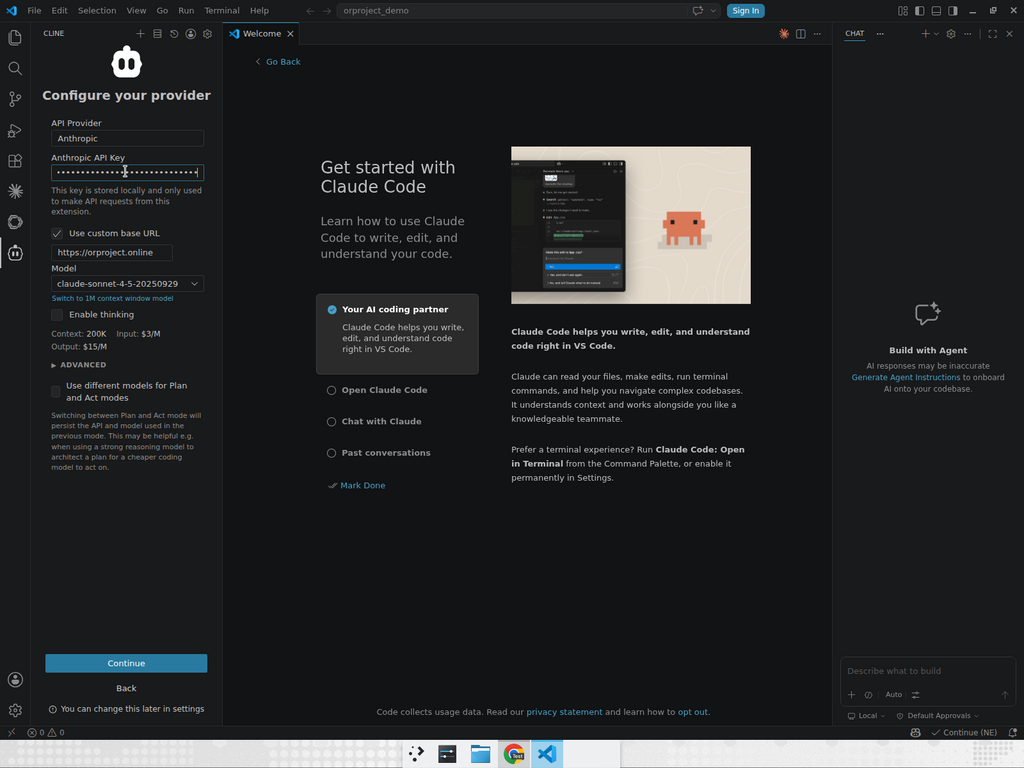
- Set API Provider =
Anthropic. - Set API Key = your
sk-ant-...issued from /admin. - Set Custom Base URL =
https://orproject.online(Cline appends/v1internally). - Pick any Claude-family model in the model dropdown.
- Click Done, then ask Cline to read or write a file in your workspace.
Cline's API Provider settings — Anthropic + custom base URL pointing to OrProject:
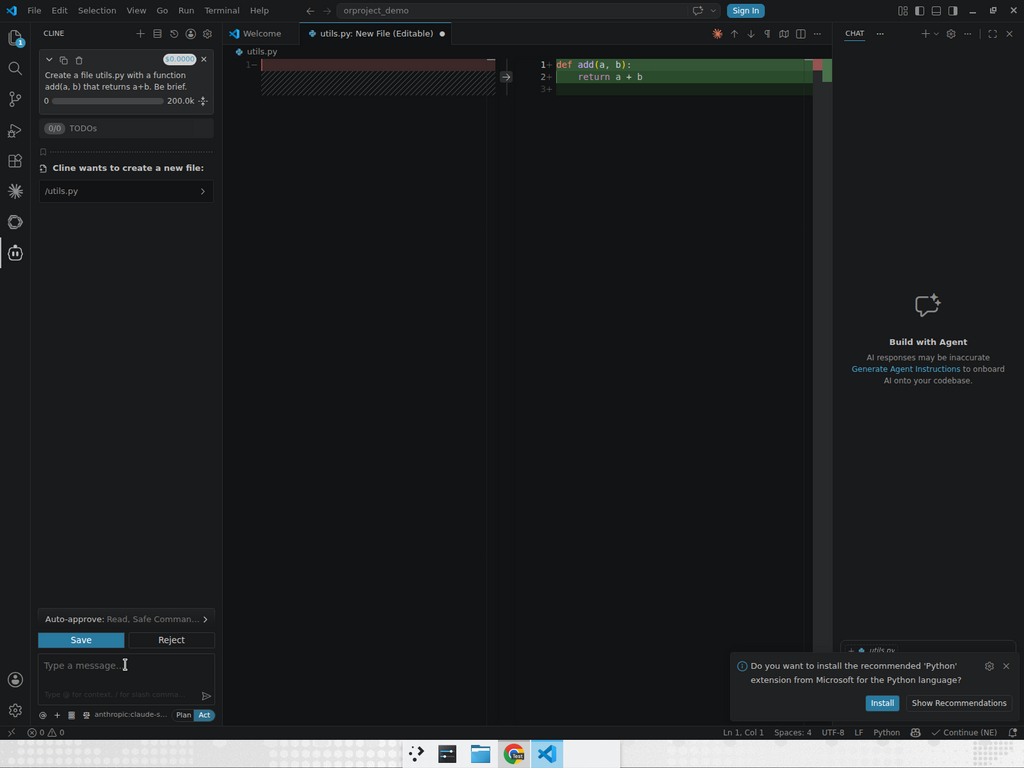
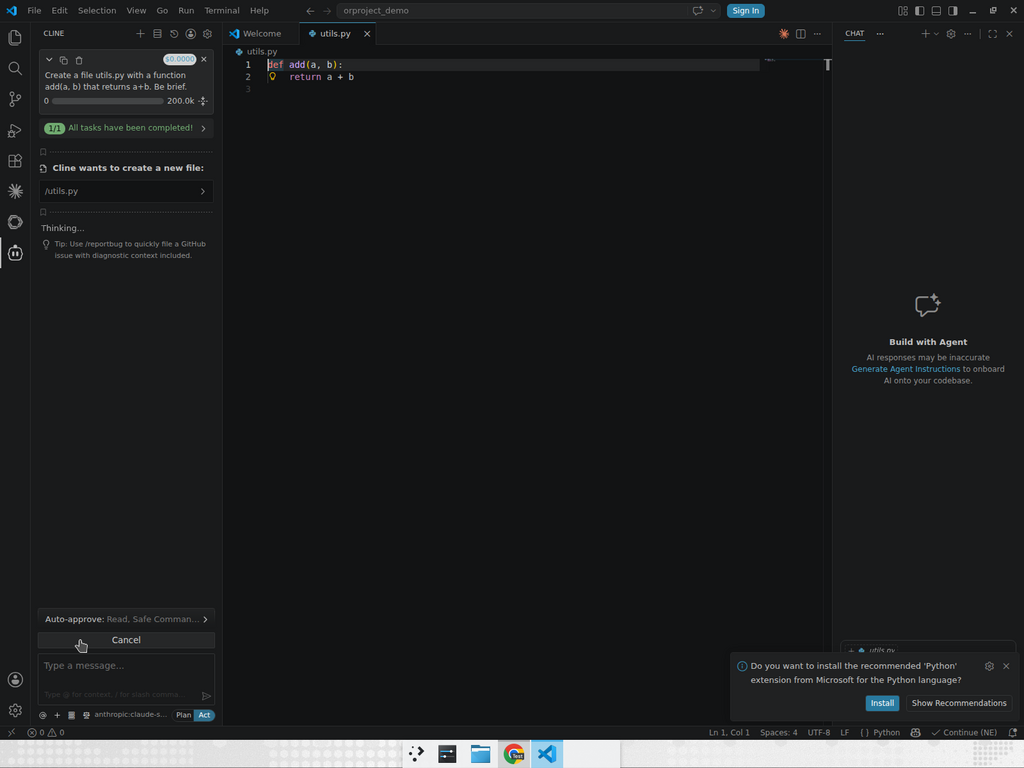
Real Cline run through OrProject — read a Python file, then write a new utils.py:
Claude Code CLI (terminal)
Anthropic's official Claude Code CLI works through OrProject as long as you point its ANTHROPIC_BASE_URL at us. The CLI manages conversation history itself, so multi-turn dialogues "just work".
# macOS / Linux
export ANTHROPIC_BASE_URL=https://orproject.online
export ANTHROPIC_API_KEY=sk-ant-YOUR_KEY_HERE
claude   # opens an interactive Claude Code session
Or persist it for VS Code's integrated terminal by writing to ~/.claude/settings.json:
{
  "env": {
    "ANTHROPIC_BASE_URL": "https://orproject.online",
    "ANTHROPIC_API_KEY": "sk-ant-YOUR_KEY_HERE"
  }
}
Continue.dev (VS Code & JetBrains)
- Install Continue from the marketplace.
- Open
~/.continue/config.jsonand add a model entry pointing at OrProject:
{
  "models": [
    {
      "title": "OrProject — Claude (Claude backend)",
      "provider": "anthropic",
      "model": "claude-sonnet-4-5",
      "apiKey": "sk-ant-YOUR_KEY_HERE",
      "apiBase": "https://orproject.online"
    }
  ]
}
After saving, Continue picks up the model immediately — open the chat panel, select the model, and chat normally. Continue manages its own conversation thread per chat tab.
Conversation memory & tool loops
OrProject is a stateless proxy — it does not keep its own copy of your dialogue. Each request must contain the full message history; whatever the IDE plugin sends is what the model sees.
- Cline / Claude Code / Continue all manage history client-side. As long as you don't restart the IDE or close the chat, the history is preserved.
- If you're calling the API yourself (curl / SDK), append every previous
userandassistantmessage — includingtool_useandtool_resultblocks — tomessageson each new turn. - OrProject mirrors past
tool_usecalls into the visible assistant text ([tool_call: name(args)]) before forwarding to the Claude backend, so the model can see which tools it already invoked and stops re-calling them in a loop. - If the model still loops on a specific tool, lower its
max_tokensor reduce the number of tools you pass — large tool catalogs increase the chance of drift.
Usage Tracking
View your API usage and remaining budget at /usage. Enter your API key to see:
- Total spend in USD
- Remaining budget (USD & tokens)
- Total requests count
- Detailed request logs with timestamps, models, token counts, and costs
Rate Limits & Budgets
Each API key has a budget (set by admin). When the budget is exhausted, requests will return a 429 error. Contact your administrator to increase the budget.
Error Handling
Errors follow the Anthropic error format:
{
  "type": "error",
  "error": {
    "type": "authentication_error",
    "message": "Invalid API key."
  }
}| Status | Type | Description |
|---|---|---|
| 401 | authentication_error | Invalid or missing API key |
| 403 | permission_error | API key disabled |
| 429 | rate_limit_error | Budget exceeded |
| 500 | api_error | Internal server error |